
 English
 Website Builder
 Site Builder
 Bespoke Websites
 Domains
 Register Domain
 Transfer Domain
 Hosting
 Web Hosting
 Cpanel Hosting
 Wordpress Hosting
 Products
 Website Security
 Website Security
 Website Builder
 XOVI NOW
 About Company
 Refund Policy
 Privacy Policy
 Terms And Conditions
 Support
 Open Ticket
 Contact Us
 Knowledgebase
 News
News
Introduction:
Most email providers want to make sure that emails sent from your domain are legitimate. To do this, they require you to have SPF (Sender Policy Framework) and DKIM (DomainKeys Identified Mail) records. Fortunately, cPanel makes it easy to set up and check these records to ensure your emails are trusted.
Checking Your Records:
To view your SPF and DKIM records in cPanel, follow these simple steps:
-
Log into cPanel: Start by logging into your cPanel account using your username and password.
-
Navigate to Email Deliverability: Once logged in, go to the "Email" section, and click on "Email Deliverability."
-
Choose the Domain: You'll see a list of domains associated with your account. Select the domain for which you want to check SPF and DKIM records and click the "Manage" button.
-
View Your Records: On the next page, you'll find two important records: DKIM and SPF. These records play a crucial role in email authentication and security.
-
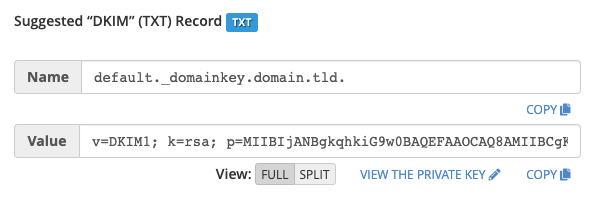
DKIM (DomainKeys Identified Mail): This record helps verify that your emails are genuinely from your domain and not forged by spammers.
-
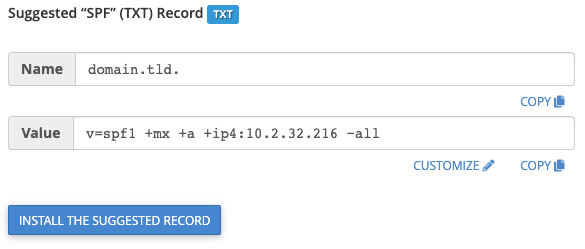
SPF (Sender Policy Framework): SPF records specify which mail servers are authorized to send emails on behalf of your domain. It helps prevent email spoofing.
-
These records are typically used in your DNS settings. If your website's DNS is hosted on your cPanel server, these records should already be in your DNS zone file. However, if you manage DNS externally, you'll need to copy and add these records to your DNS server settings to ensure your emails are properly authenticated.
By following these steps, you can easily check and manage your SPF and DKIM records in cPanel to enhance your email security and deliverability. If you have any questions or need further assistance, don't hesitate to reach out.